Posts

Showing posts with the label Google

I Hate Google Maps

Image
This is feedback I just sent to Google Maps using the "feedback" option. As you can tell, I was (am) a little annoyed that I had to stop and address something so basic it should have been included in the product of a multi-billion dollar company that has hundreds of millions of users every single day.  Google Maps is absolutely atrocious for making custom maps. It was so much easier when the MyTracks app was around, but like all good things, Google canned it years ago (and none of the other Play store offerings are nearly as good).  But, since I'm trying to demonstrate to someone the walking trail I found in when I was visiting Florida, I opened Maps (then had to search why I can't create a custom map only to discover I had to open MyMaps.google.com [which is dumb]). Then, I'm creating a simple walking map: start point? Check. Draw a line for the loop? Nope, not an option. Why? Because Google Maps is atrocious for just about anything that is actually useful (which...
Forced Compliance, a Service by Google

Image
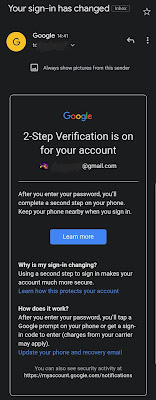
 Let me start by saying 2-factor authorization is a good idea. In fact, it's a great idea for security, especially if your computer or password is compromised. That being said, Google recently announced that it would automatically enroll everyone into 2-factor authorization, whether they want to be or not.  Now, I understand Google probably has metrics on the back end showing how many accounts are compromised and how often, but to auto-enroll people into a program they may not even understand isn't the way to make things safer overall.  Education is the best way to make the internet and e/Gmail accounts more secure. Strong passwords, not using the same password in multiple locations, using a VPN when out and about, etc. Forcing people - people like my mom or someone who only has a Gmail account because they have an Android phone - to use a service that requires their phone be by their side at all times does a disservice to everyone - everyone except Google themselves. Wha...

Search Google

There are a lot of nifty tips and tricks to using some of Google's built-in search tool. I, myself, use many of these on a near daily basis while others I've heard about have have never explored. What's your favorite Google search trick? https://www.fastcompany.com/90308480/40-incredibly-useful-things-you-didnt-know-google-search-could-do

Alternatives to Voice?

I don't think GV is going anywhere but it's always nice to have alternatives to Google products, especially Alphabet abandoned it's policy not to be evil. https://z6mag.com/technology/google/3-effective-alternatives-to-google-voice-1632467.html There may be other options out there as well. To be honest, I haven't looked as I've been using Voice since it was available, but if the world of apps has taught us anything, there can never be only one. I do know there are a plethora of video messaging apps out there that have replaced simple voice communication for a lot of consumers and plenty more apps that carry voice across data plans as opposed to analog networks.

Alright, I got a giggle out of this.

Alright, I got a giggle out of this. If #Google were a black man. https://youtu.be/s15aGn68LOQ

Isn't this behavior typically known as a "fishing expedition" and generally illegal due to that pesky Constitution?

Isn't this behavior typically known as a "fishing expedition" and generally illegal due to that pesky Constitution? #Google http://www.wral.com/scene-of-a-crime-raleigh-police-search-google-accounts-as-part-of-downtown-fire-probe/17340984/

#Datally, by #Google, seems to be focused towards two very distinct groups:

#Datally, by #Google, seems to be focused towards two very distinct groups: 1) Project Fi, and similar service, users who may want to better manager their data use as not to move up a paid tier, and 2) Persons on limited data plans, maybe in developing nations or pay-as-you-go devices, who are budgeting data usage. Both of these have the same basic need: to have more granular control over their device's data usage in order to save money. https://play.google.com/store/apps/details?id=com.google.android.apps.freighter&hl=en&_utm_source=1-2-2

In #TrumpNation aren't we all activists and dissidents?

In #TrumpNation aren't we all activists and dissidents? The opt-in, ultra-secure mode is intended for truly high-risk users, including those who face the threat of state-sponsored, highly resourced cyberespionage. Think politicians and officials, high net-worth individuals, activists, dissidents, and journalists. #Google #Gmail #GoogleDrive https://www.wired.com/story/google-advanced-protection-locks-down-accounts

Parking this here so I can remember to peruse it at my liesure another day.

Parking this here so I can remember to peruse it at my liesure another day. #Google #DataStudio #GSuite https://plus.google.com/+GooglePartners/posts/hzKMJnKuoQG?_utm_source=1-2-2

Of all the headlines I never thought I'd ever read, this has got to be the most shocking.

Of all the headlines I never thought I'd ever read, this has got to be the most shocking. #Google has announced it will no longer be scanning #Gmail for ad targeting. #Whoa. https://techcrunch.com/2017/06/23/google-has-all-the-data-it-needs-will-stop-scanning-gmail-inboxes/

New look coming soon, apparently. #Google

Image
New look coming soon, apparently. #Google

Google Products - a complaint

Image
Oh, come on, Google! This has got to be one of the most annoying websites ever.  Let me explain: We all have that (annoying) red bar at the top of our pages. Saddled between the "SEARCH" bar and our account profile pic are the 9 squares set in a 3x3 formation. Clicking this box opens up shortcuts to Google services. Easy peasy, right? Sure. Unless you're looking for something not there. So, you scroll down and click on "Even more from Google" which opens up the page linked to below.  Great! Right? Well, no.  You find the product you're looking for and instead of clicking on it, thinking it's going to take you to the associated page, you have to know to use the "Getting Started" link below the associated service, then choose for web , for mobile , etc. Click on "Getting Started" And worse yet, not even all products are listed! Where's  +Blogger ? Or Google Voice? Under "Stay in touch" ...

Day One Without a Cellphone

Image
Let me preface this by saying I grew up long before cell phones were in everyone's pocket. In fact, I didn't have my first cell phone until I was in my twenties, so I know a thing or two about living without having the world's knowledge at my fingertips. My first day without a cell phone was both frustrating and liberating. It began as all things do - in the beginning: My alarm didn't go off. As it turns out, like many of us, I use my cell phone as an alarm clock, which is convenient since it's on the charger all night next to the bed. Normally in the mornings I'll check for any emails that came in overnight, check the headlines to make sure no one has started World War III and then, maybe if I'm not in a rush, I'll flip through social media to see who's doing all the exciting things I'm not. Or look at pretty pictures. The real inconvenience came when I realized I had no reminder for an appointment. Luckily for me I knew the appointment ...

Ooops... I think I broke it.

Image
I titled this "Oops" as though I this was an error. No, this was not an error. This is what happens when your frustrated with a (Google) app constantly not working right and a touchscreen that has decided to have dead spots - spots on the screen that no longer reacted to touch.  Yeah, this was no "Ooops" but rather the result of not having a hammer or rock nearby. I really would have preferred a sledge hammer. So, now I'm in shopping for a new inexpensive phone and have my eye on a 2-2 1/2 year old BlackBerry just because it's cheap (and has a physical keyboard. Oh, how I miss having a physical keyboard!) Heck, I'd even consider the new Nokia if they were out already. In the meantime I'm phone-less. Luckily most people have my Google Voice number where I can send and receive SMS messages, check voicemails and even make and receive calls from my computer. TMo Rep Said They Couldn't Fix That

It's.

It's. Not a bad idea to check your accounts once in a while, especially if your SO is the jealous type or you feel someone has hacked your account. #socialmedia #facebook #Twitter #Google http://fieldguide.gizmodo.com/how-to-check-if-someone-else-is-using-your-social-media-1783817899

Google Now, Trebuchet and Frustration

Image
One minute you wake up and the next you're wondering WTF just happened here. That's what happened to me yesterday. Like most days I was going about my business not bothering anyone when Google (via Android on my phone) informed me there were some apps that were ready for updates. As I'm not one to have thousands of apps on my devices, and most of those being official "Google" apps, I went ahead and hit the button for "update all." A little later in the day I found myself in a place with no cellphone coverage. The receptionist even asked me if my carrier was T-Mobile when I mentioned something about having no service to my friend. Apparently, TMo is the only service provider in the area who doesn't get service in that particular office. Fast forward about 40 minutes and we leave. As soon as we step outside my phone informs me there is an OS (that's operating system  to you laymen) update. A little excited about the fresh new goodies I'm a...

That seems like an extremely awesome feature.

That seems like an extremely awesome feature. Originally shared by Kickedface A small tip for all Android Users. So who knew this one? #Android   #Hangouts   #HangoutDialer   #Google   http://kickedface.blogspot.com/2015/09/tip-use-nfc-to-transfer-hangouts-calls.html

Using feedly ? Using Google Now?

Using feedly ? Using Google Now? Guess what? You can now use them both ... at once! Originally shared by Kim Flowers (Kimmy) Feedly Integration with Google Now = Winning! #google   #googlenow   #feedly   #rss   #content   http://blog.feedly.com/2015/08/05/feedly-google-now-your-most-important-stories-when-you-want-them/

Google Drive Folder Syncing

Image
Whew! What a giant pain in the ass! A few months ago, for a contract I was working, I had to download Google Drive onto my PC and set it up for syncing with the project manager so they could push out updates easily. At the time I thought it was convenient. That was until the project was over and I wanted to switch the desktop sync-folder from one Gmail account to another. That, it seems, was easy, but not very well explained. First, I found this explanation on Google's Drive Support Pages . Alright, I followed steps one through five on the Google Drive for your PC/Mac section, but couldn't for the life of me figure out what they meant with steps six through nine: 6. To sign in to another account, go to the Google Drive menu, and select Sign in. 7. Rename your Google Drive folder (example: Google Drive Archive). 8. Create a new folder titled Google Drive and don’t add any files in the folder. 9. Your files will begin automatically syncing.  Was this telling me to sig...

Dear Google Maps, Part Deux

Image
Dear +Google Maps , Part Deux, A few days ago I sent feedback about a location. Specifically, that the location no longer held a certain business, The Salad Bowl. Local Page Let's roll back a few blog posts. Remember this one ? I reported the restaurant closed via the Google Maps report feature and received and email stating the restaurant is still active? Well, Google Maps, you're at it again. You see, I walk past this spot four or five times a week. In street view, do you see that space to the left of the Salad Bowl, the one with the tree? Yeah, that spot. I walk through that every single time I go to the gym and I go four or five days a week, depending on the week. You see that pet store next to the Salad Bowl? Look to your left. Okay, yeah, right there. Yeah, I shop there for dog treats, fish supplies and various other bits. Streetview One might say I'm fairly well versed in that corner of the strip mall. And yet, I receive this email from you: From: ...